Open PSD files online, with every layer
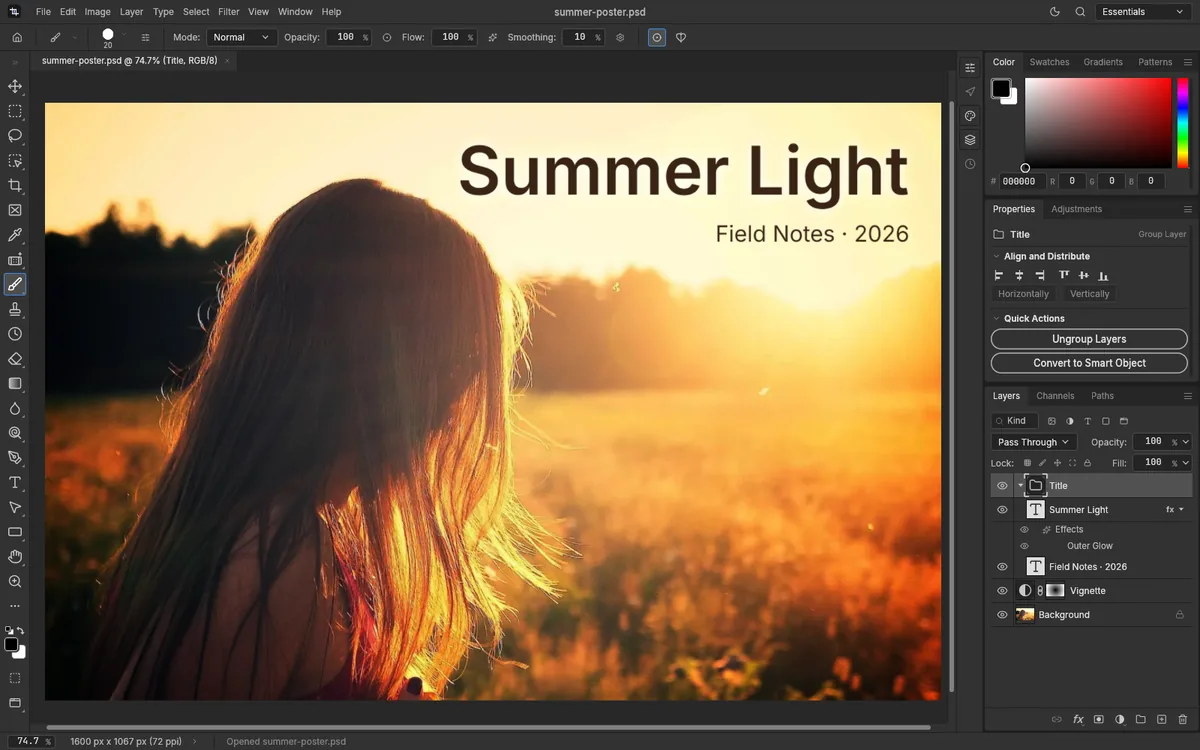
To open a PSD file online, drop it in the box below. It opens in the PhotopixPro editor right in your browser, with its layers, groups, masks and text, and nothing is uploaded. You don't need Photoshop or an account. From there you can look through the layers, change things, or export a PNG or JPG.
Drop the file here, or use the button below. Your PSD opens in the editor with all its layers.
PSD or PSB, and images such as JPG, PNG or TIFF. Never uploaded.
How to open a PSD file online
- Choose the file
Drop the PSD on the box or pick it with the button. The first time, your browser downloads the editor, about 11 MB.
- Look through the layers
The Layers panel lists every layer and group. Turn a layer off to see what's under it, or select it to see its settings in the Properties panel.
- Save or export
File > Export > Export As… gives you a PNG or JPG. File > Save downloads the PSD with any changes you made.
What you see when you open a PSD online
The editor reads the whole structure of the file, not just a flat preview:
- Layers and groups, including groups set to Pass Through, with their opacity and blend modes.
- Masks: pixel masks, vector masks and clipping masks.
- Adjustment and fill layers, such as Curves, Levels, Color Lookup, Gradient Map or Solid Color.
- Text layers, both point text and paragraph text.
- Smart objects, embedded and linked, and the smart filters applied to them.
- Layer styles: all ten Photoshop layer styles, from Drop Shadow to Bevel & Emboss.
- Artboards, if the document has them.
We checked this on October 17, 2026, with 21 real PSD files, six of them made in Photoshop. All 21 opened, and between them they covered every element in this list. Read how we test PhotopixPro.
What may look different
PSD is Adobe's own format, and apps other than Photoshop can't match every detail. PhotopixPro warns you about missing fonts and lookup tables. Effects can differ without a warning:
- Fonts. On the web, the editor has two fonts, Inter and JetBrains Mono, and it can't use the fonts installed on your computer. If a PSD uses another font, you'll see a warning that the font isn't installed, and the text may switch to a substitute font when you edit it.
- Color Lookup tables. If an adjustment uses a lookup table the editor doesn't support, it warns you.
- Effects. Some layer effects can look slightly different from Photoshop.
If something looks wrong, tell us what you opened. You don't need to send the file.
Large PSD and PSB files
PSB is the format Photoshop uses for very large documents. The editor opens PSB files too, with their layers, groups and clipping masks, though the ones we've tried so far were small. Saving one downloads a PSD. In our tests, a 4000 × 3000 pixel image with three layers saved as a 98 MB PSD in about 7 seconds and reopened correctly. The editor works on a single thread, so heavy steps on files that size can freeze the tab for a few seconds. We haven't tested files larger than about 100 MB yet.
On a phone or a Chromebook
The editor is built for a computer with a keyboard and a mouse or pen, and it has no phone layout. On a phone, it offers to share the link so you can open the PSD later on your computer. To just look at a PSD on a phone, see the phone section of our guide to opening PSD files without Photoshop.
We haven't tested PhotopixPro on a Chromebook yet. It needs a browser with WebGPU or WebGL2; if you try it, tell us how it went.
Other ways to open a PSD
If you only need to look at the image on a Mac, Adobe says the built-in Preview app opens and views PSD files, though it can't edit them. Desktop apps such as GIMP and Krita also read PSD files. Photopea also opens PSD files in a browser; our Photopea alternative comparison shows how the two differ. Our guide compares every way to open a PSD without Photoshop, device by device. If you're not sure what's in the file, start with what a PSD file is.
Frequently asked questions
Is this PSD viewer free?
Yes, completely. There's no account, no paid plan and no ads, and you can open as many PSD files as you like. PhotopixPro is more than a viewer: the same editor lets you change the file and export it as PNG, JPG or WebP, without a watermark. When you're done, you just close the tab.
Is my PSD uploaded to a server?
No. Your browser reads the file from your disk, and the editor works on it inside the tab. The only things our server sends are the editor's own files. If you start from this page, the file waits in your browser's storage while the editor loads, and it's deleted as soon as the editor opens it.
Can I see and export individual layers?
Yes. The Layers panel lists every layer and group; hide a layer to see what's under it. To save one layer as an image, select it and choose Layer > Quick Export as PNG: you get a PNG of just that layer, trimmed and transparent, as the PSD to PNG page explains. For the whole picture, use File > Export > Export As… instead.
Does it open PSB files?
Yes, with their layers, groups and clipping masks, though we've only tried small ones. Saving one downloads a PSD, not a PSB. According to Adobe, PSB is the larger form of PSD for documents over 30,000 pixels or 2 GB. How big a file you can work with depends on your computer's memory; we've tested PSD files up to about 100 MB.
Why does the text in my PSD look different?
Most likely, the PSD uses a font the editor doesn't have. On the web, PhotopixPro only has Inter and JetBrains Mono and can't use the fonts on your computer. When a PSD uses another font, the editor warns you, and the text may change to a substitute font when you edit it. If you only need the image, export it before you touch that text.
Can I open a PSD on my phone?
Not in this editor: it's made for computers and has no phone layout. If you open it on a phone, it offers to share the link for later. To view a PSD on a phone, Adobe says its Photoshop Express app can open PSD files on iPhone and Android. Our PSD guide covers the other options.
What if my PSD doesn't open?
First check that the file name ends in .psd or .psb and that it has finished downloading or syncing. If the editor shows an error or the file looks wrong, write to us with your browser, the file size and what you see. You don't need to send the file. We can't repair damaged PSD files, but your report helps us improve the editor.
Other tools
- Edit PSD online Change text, layers and colors in a PSD, then save it again.
- Edit PNG or JPG Crop, resize, retouch and add text to a PNG or JPG, then export it again.
- PSD to PNG Export a PSD, or only some of its layers, as a PNG with transparency.
- PSD to JPG Turn a PSD into a smaller JPG at the quality you choose.
- HEIC to JPG Turn HEIC photos into JPG without uploading them anywhere.
- Open RAW online Open CR2, NEF, ARW and DNG photos, adjust them and export a JPG.
- PNG to PSD Turn a PNG or JPG into a PSD, keeping a PNG's transparency, and add layers on top.
Related guides
- Open PSD without Photoshop Ways to open a PSD on Windows, Mac, Chromebook and phones.
- What is a PSD file What a PSD stores, how it differs from PNG and JPG, and how to open one.
- Layers for beginners Add, rename, reorder, group and merge layers, with opacity and blend modes.
- Layer masks What layer masks and clipping masks do, and how to add, paint and apply a mask.
- Curves and Levels What Curves and Levels do, when to use each, and how to keep them editable.

Have a PSD to open?
Open the editor and drop your file on it. Nothing to install, nothing uploaded.