Which option to use
| Your device | To view a PSD | To edit its layers | Needs an install? |
|---|---|---|---|
| Windows | A browser editor, such as PhotopixPro | PhotopixPro in the browser, or GIMP, Krita or Affinity | Not for a browser editor; GIMP, Krita and Affinity are installed |
| Mac | Preview, built into macOS | PhotopixPro in the browser, or GIMP, Krita or Affinity | Preview is built in; GIMP, Krita and Affinity are installed |
| Chromebook | A browser editor | A browser editor, or Linux apps if your Chromebook allows them | Linux apps need Linux turned on |
| iPhone, iPad and Android | Adobe's Photoshop Express app, or a web editor that works on phones | Easier on a computer; Procreate on an iPad imports the layers but turns text into pixels | Photoshop Express and Procreate are apps |
Checked on October 17, 2026, from each maker's own pages; the sources are under How we checked this guide.
In your browser with PhotopixPro: layers, nothing to install
This needs a desktop browser with WebGPU or WebGL2. Nothing is installed and the file isn't uploaded.
- Go to Open PSD online, or open the editor directly.
- Drop the PSD on the page, or in the editor choose File > Open… (Ctrl+O). The first visit downloads the editor, about 11 MB.
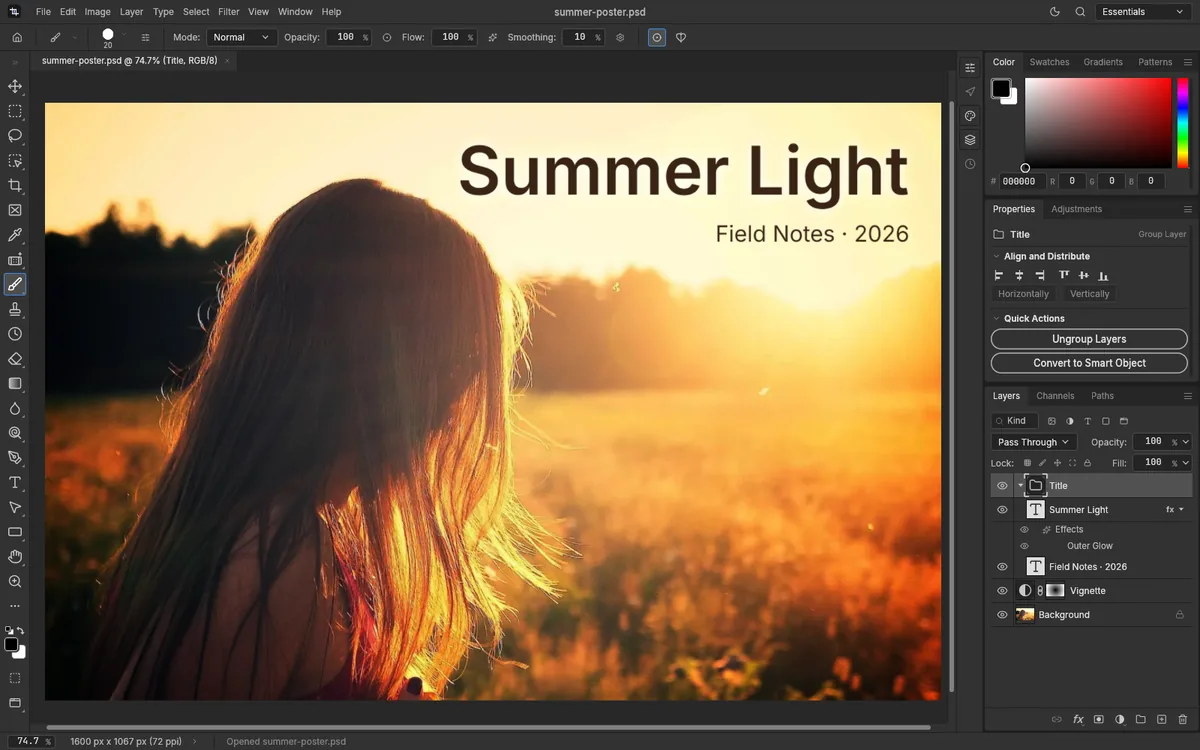
- Look through the layers in the Layers panel (Window > Layers).
- To get an image, choose File > Export > Quick Export as PNG, or File > Export > Export As… for a JPG. To keep the layers, File > Save downloads a PSD.
So far we've tested PhotopixPro in Chromium; we haven't checked Firefox or Safari yet. It's built for a keyboard and a mouse or pen, not for phones.
Windows 10 and 11
According to Adobe, you need extra software to open PSD files on Windows. These are your options.
A browser editor: no install, works on locked-down PCs
PhotopixPro, as above, or Photopea, which also runs in the browser. Nothing gets installed, which helps on a work or school PC where you can't add programs.
GIMP, Krita or Affinity: desktop apps you install
GIMP is free software for Linux, macOS and Windows, and its developers list PSD and PSB among the formats it imports and exports. Krita is a free painting program; its documentation says it loads raster layers, blend modes, layer styles, vector shapes, text layers, groups and transparency masks from PSD files. Affinity, from Canva, is free for individuals on Windows and macOS, though you have to sign in with a Canva account, which you can create for free, to download and activate it; its makers say it imports PSD files with their structure and layers.
Mac
Preview: view only, no editing
Adobe says the Preview app in macOS opens and views PSD files, though you can't edit them there. Open the file in Preview to see the picture. You can also try Quick Look: select the file in the Finder and press the Space bar.
To save a copy as JPG or PNG, choose File > Export in Preview and pick the format in the Format menu, as Apple's Preview guide explains.
A browser editor or a desktop app: layers
To work with the layers, use a browser editor such as PhotopixPro, or install GIMP, Krita or Affinity. We haven't tested PhotopixPro in Safari yet; if it doesn't start there, try another desktop browser.
Chromebook
A browser editor: the simplest option
We haven't tested PhotopixPro on a Chromebook yet. It needs a browser with WebGPU or WebGL2; if you try it, tell us how it went. Photopea, which says it runs on any device, is another option.
Linux apps: if your Chromebook allows them
Some Chromebooks can run Linux software. Google's instructions: select the time at the bottom right, open Settings, go to About ChromeOS, then Developers, and next to "Linux development environment" select Set up. Google warns that setup can take 10 minutes or more and that work or school Chromebooks may not allow it. GIMP has a Linux version.
iPhone, iPad and Android: PSD files on mobile
A common case: a PSD arrives by email or in a chat, and your phone won't open it.
Photoshop Express: Adobe's app for phones
Adobe says its Photoshop Express app can open PSD files on an iPhone or an Android phone.
Procreate on an iPad
Procreate's handbook says the app imports PSD files with their layer groups and blend modes, and turns vector and text layers into pixels.
A web editor that works on phones
Photopea says it runs on any device, so you can try opening the PSD in your phone's browser there.
PhotopixPro: better on a computer
PhotopixPro isn't designed for phones: it needs a keyboard and a mouse or pen, and it has no phone layout. If you open the editor on a phone, it offers to share the link so you can open the PSD later on your computer. On a tablet the editor can load, but touch support is basic.
If you need to edit the layers, not just look at them, a computer makes it much easier.
What you lose when you open a PSD outside Photoshop
PSD is Adobe's own format. GIMP's developers note that its public specification isn't always complete, and Krita's documentation says no program outside Photoshop can support it 100%. In practice, this is what can change:
- Viewers don't edit. Preview and similar apps show the picture, but you can't change layers or text.
- Fonts. If an app doesn't have the font, text is shown or edited with a substitute. In PhotopixPro on the web, only Inter and JetBrains Mono are available.
- Effects and adjustments. Layer styles, smart filters and some adjustment layers can look slightly different. PhotopixPro opens all ten Photoshop layer styles, but some effects may still differ.
- Smart objects. Support varies from app to app. PhotopixPro opens embedded and linked smart objects.
- Exports are flat. PNG and JPG merge all visible layers into one image.
If you're thinking of leaving Photoshop altogether, our free Photoshop alternative comparison lists what you'd gain and lose.
How we checked this guide
We tested the PhotopixPro steps on October 17, 2026, in Chromium, with 21 real PSD files, six of them made in Photoshop. We didn't test the other apps ourselves: what this guide says about Preview, Quick Look, Photoshop Express, Procreate, GIMP, Krita, Affinity, Photopea and ChromeOS comes from their makers' own pages, which we read on the same date:
- Adobe: the PSD file format, for Preview, Windows, Photoshop Express and PSD limits.
- Apple: Quick Look and converting files in Preview.
- GIMP: home page and supported image formats.
- Krita: home page and PSD support.
- Affinity: home page and getting Affinity, for the price, the Canva account, the platforms and PSD import.
- Photopea: home page.
- Procreate: file types it imports.
- Google: setting up Linux on a Chromebook.
If something has changed, let us know.