Open RAW photos online and turn them into JPG
To open a RAW file online, drop it in the box below. Canon CR2, Nikon NEF, Sony ARW and DNG photos open in PhotopixPro at full resolution and in 16 bits, first in the editor's Camera Raw dialog, with exposure, white balance and contrast controls. Then export a JPG. It's free, and the photo is never uploaded.
Drop the photo here, or use the button below. Your CR2, NEF, ARW or DNG file opens in the editor's Camera Raw dialog, at full size.
CR2, NEF, ARW and DNG; CR3 as a preview only. Read by your browser, never uploaded.
How to open a RAW file online
- Choose the RAW file
Drop it on the box or use the button. The first time, your browser downloads the editor, about 11 MB.
- Adjust it in Camera Raw
The Camera Raw dialog shows the photo and its histogram. Set the exposure, white balance or contrast, then click Open.
- Export a JPG
Choose File > Export > Export As…, set Format to JPG and click Export. To keep editing later, File > Save downloads a PSD.
Which RAW files open
We opened one file from each of these cameras on October 17, 2026:
| Format | Camera we tried | Result |
|---|---|---|
| CR2 (Canon) | PowerShot SX50 | Full resolution, 16 bits |
| NEF (Nikon) | D3 | Full resolution, 16 bits |
| ARW (Sony) | RX0 | Full resolution, 16 bits; the file had no white balance setting, so the editor estimated it |
| DNG | A Canon DNG and an iPhone 12 Pro ProRAW photo | Full resolution, 16 bits |
| CR3 (Canon) | EOS M50 | Only the JPEG preview stored inside the file, in 8 bits, with a warning |
Other RAW formats, such as Olympus ORF, Fujifilm RAF, Panasonic RW2 and Pentax PEF, haven't been tested yet. If your camera's files don't open, tell us which camera it is.
The Camera Raw dialog
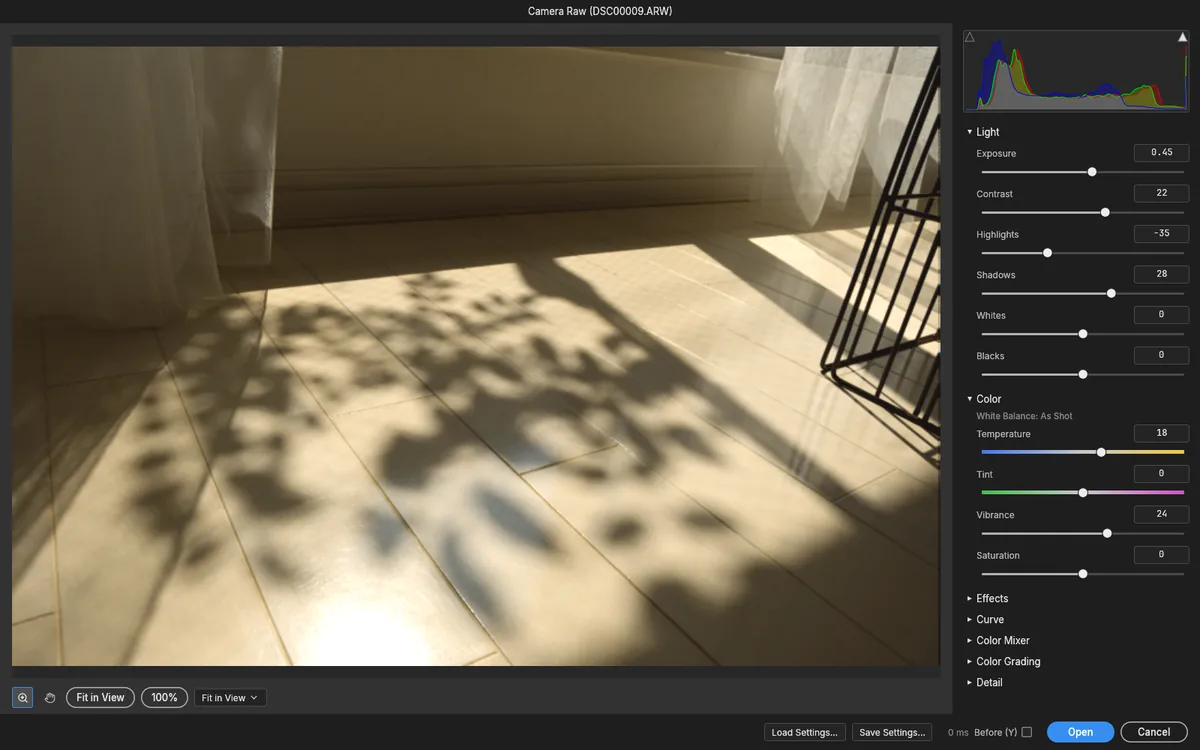
A RAW file opens in the editor's Camera Raw dialog first, named after the file, and becomes a document when you click Open. On the left is a preview you can zoom, with Fit in View and 100%. On the right, a histogram with clipping warnings, then the panels:
- Light: Exposure, Contrast, Highlights, Shadows, Whites and Blacks.
- Color: White Balance (As Shot to start with), Temperature, Tint, Vibrance and Saturation.
- Effects, Curve, Color Mixer, Color Grading and Detail, for finer work.
Below them are Load Settings…, Save Settings…, Before (Y), Open and Cancel. In our test, raising Exposure to +1.7 brightened the preview and the histogram straight away, and the JPG we exported afterwards came out lighter too.
After Open, the photo is a 16-bit document with a single Background layer. You can keep editing it with layers, the Crop Tool, Image > Image Size… or Curves and Levels adjustment layers.
Colors start from the JPEG the camera stores inside the RAW file, so the first view looks like the camera's own picture. This isn't a calibrated RAW conversion of the kind dedicated photo software makes, and some DNG features, such as the local tone mapping of iPhone ProRAW, aren't applied yet.
RAW to JPG
Once the photo is open, choose File > Export > Export As… (Ctrl+Alt+Shift+W). The dialog starts on PNG: set Format to JPG, keep Quality at 85 or move the slider, and check the estimated size. Click Export and the JPG downloads to your computer. The editor warns that the 16-bit photo becomes 8-bit, which is normal for JPG. Our 12-megapixel Nikon photo came out as a 743 KB JPG at quality 85.
PNG and TIFF are in the same Format list if you'd rather avoid JPG compression.
It's one photo at a time: batch processing is turned off in the web version. For a whole memory card, desktop software that processes folders will be faster.
Memory and speed
RAW files are large once decoded. In our tests, a 12-megapixel Nikon photo used about 800 MB of memory in the browser tab, counting the editor itself. The editor works on a single thread, so heavy steps can pause the tab for a few seconds. Close other heavy tabs if your computer is short of memory, and save often: there's no autosave.
Frequently asked questions
How do I open RAW files on a PC or Mac without extra software?
Use a desktop browser: drop the file on this page and it opens in the PhotopixPro editor, with nothing to install. Canon CR2, Nikon NEF, Sony ARW and DNG files open at full resolution, through a Camera Raw dialog. So far we've tested the editor in Chromium; it needs a browser with WebGPU or WebGL2, and the photo is never uploaded.
Can I convert RAW to JPG online for free?
Yes. Open the CR2, NEF, ARW or DNG file here, adjust it in Camera Raw if you like, click Open, then choose File > Export > Export As… and pick JPG. It's free, with no sign-up, no watermark and no ads. Conversion happens in your browser, one photo at a time, and the JPG goes straight to your downloads folder.
Can I convert RAW to JPG without losing quality?
Not entirely. A JPG stores 8 bits per channel and compresses the image, so it keeps less than the RAW file. To lose as little as possible, make your exposure and color changes before you export, and raise the JPG quality slider above the default 85. Keep the RAW file, or save a PSD, in case you want to edit and export again later.
Can I open Canon CR3 files?
Only partly. The editor can't decode CR3 RAW data yet, so it opens the JPEG preview that the camera stores inside the file, in 8 bits, and tells you so. That's enough to look at the photo or share a JPG, but you can't recover highlights or shadows the way you can with a real RAW file. The CR2 file we tried, from an older Canon PowerShot, opened in full.
Are my RAW photos uploaded to a server?
No. Your browser reads the file from your disk and the editor processes it inside the tab. Our server only sends the editor's own files, and the editor has no telemetry or error reporting that could send your photo anywhere. That also means a large RAW file doesn't have to travel over a slow connection before you can see it.
Can I convert many RAW files at once?
No. Batch processing is turned off in the web version, so you open and export one photo at a time. That's fine for a handful of pictures. For hundreds of files from a shoot, desktop software that can process a whole folder in one go will save you a lot of time.
Can I open RAW files on my iPhone or phone?
Not comfortably. The editor is built for computers with a keyboard and a mouse or pen, and it has no phone layout. On a phone, it offers to share the link so you can open the editor on your computer later. RAW files also need a lot of memory once decoded, which a computer handles better.
Other tools
- Open PSD online See every layer, mask and text of a PSD file without Photoshop.
- Edit PSD online Change text, layers and colors in a PSD, then save it again.
- Edit PNG or JPG Crop, resize, retouch and add text to a PNG or JPG, then export it again.
- PSD to PNG Export a PSD, or only some of its layers, as a PNG with transparency.
- PSD to JPG Turn a PSD into a smaller JPG at the quality you choose.
- HEIC to JPG Turn HEIC photos into JPG without uploading them anywhere.
- PNG to PSD Turn a PNG or JPG into a PSD, keeping a PNG's transparency, and add layers on top.
Related guides
- Open PSD without Photoshop Ways to open a PSD on Windows, Mac, Chromebook and phones.
- What is a PSD file What a PSD stores, how it differs from PNG and JPG, and how to open one.
- Layers for beginners Add, rename, reorder, group and merge layers, with opacity and blend modes.
- Layer masks What layer masks and clipping masks do, and how to add, paint and apply a mask.
- Curves and Levels What Curves and Levels do, when to use each, and how to keep them editable.

Have a RAW photo to open?
Open the editor and drop the file in. It stays on your computer.